Weve saved some files called cookies on your device. These cookies are:
- essential for the site to work

We would also like to save some cookies to help:
- improve our website by collecting and reporting information on how you use it
- tailor communications

Change cookie settings Read more about our cookie policy
Skip to content
  • Welsh
  • English
Sign in Create account
  • Home
  • Public Appointments
  • Help centre
  • Sign in Create account

WELSH GOVERNMENT

Jobs and vacancies

Help Topics FAQ

  • Sign in issues

    Sign in issues
    • I cannot view the login page
    • I have forgotten my login details
    • My email has changed
    • I am stuck on the login page
    • What is my username?
    • Why is my login incorrect?
    • When I try to register I am told I have an existing account
  • Problems saving application form

    Problems saving application form
    • Cannot Edit Fields
    • My data is not updating
    • My information has disappeared
    • My information is not visible
  • Submission issues

    Submission issues
    • I haven't completed all the mandatory fields
    • I cannot access my saved/submitted application form
  • Amending information

    Amending information
    • How do I edit my personal details?
    • Remove my personal information
  • Online assessments

    Online assessments
    • Assessment not launching
  • Contact us

    Contact us

How to delete cookies in Internet Explorer

Internet Explorer 11.0

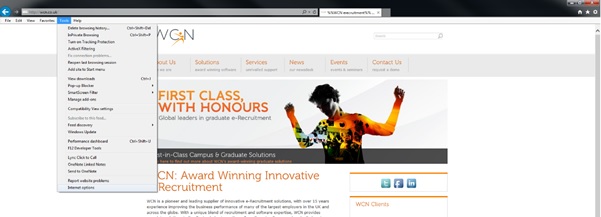
Open Internet Explorer if it is not already open.

Click on Tools.

Click Internet options.

A new screen will appear.
Select the General Tab.
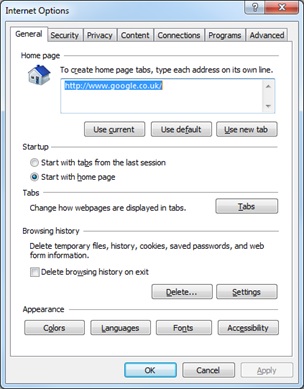

Click on the Delete button under the Browsing History section.

Only check Cookies and website data.
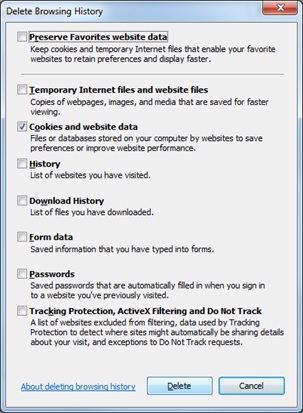
Press Delete.

Cookie Policy
  • Contact us
  • Accessibility
  • Cookies
  • Copyright statement
  • Privacy
  • Terms and conditions

Powered by

oleeopower